
The test footage is a 16-second commercial with eleven cuts. The job was to keep every cut, camera move and gesture and replace everything else: five main people, five locations, the brand colour, and every subtitle, logo and floating graphic. Each new person and place was made first as a still and approved, and every tool below got the same stills.
The result was needed in 9:16 and in 16:9, which splits the work into two different jobs. Replacement changes what is in the frame and must keep the motion. Reframing turns a finished vertical cut into a wide one by inventing the missing sides. This note compares both on the same footage.
Replacement: what kept the motion
The test is simple. Play the result next to the source: does every person still move, turn and cross the frame at the same moment, and did the cuts stay where they were?
| Route | Motion and cuts | People | Places | Run |
|---|---|---|---|---|
| Higgsfield Genjutsu Lite, replace | Kept | All recast | Swapped; it moved one person to a different location | 16 s in one pass, 9:16, 1080p |
| Seedance 2.5 Preview, Dreamina, video plus pictures | Lost: the shot was re-staged and one person froze | Good likeness | Swapped | 5 s test, 480p |
| Kling 4.0 Edit | Kept | Good likeness; one background extra stayed | Strongest swap | 5 s tests, 720p and 1080p |
| Wan 3.0 reference-to-video, used as an edit | Kept to the frame | Best background extras | Good in short runs; weak when overloaded | runs of 3 to 10 s, 1080p |
Seedance 2.5 kept a talking head best in our room and outfit test, so its failure here needs a word. In Dreamina, a video plus reference pictures goes through the multimodal mode, which generates a new clip guided by the video. There is no edit switch. The people and places were right; the performance was not.
Seedance 2.5 Preview · 480p
Re-generated: the man stands still
The new person and the new truck are right, but he holds one pose for the whole shot, and the worker strolls through the middle distance instead of the foreground.
Kling 4.0 Edit · fal · 1080p
Edited: the source performance survives
The worker crosses the foreground to the truck at the same moment as in the source, and the man looks up from his phone and smiles.
Two routes were not run. H3 Max Recast on fal swaps people only, up to four, and would have left the locations, the colour and the text. Kling O3 Edit builds each replacement around one main character, so a shot with several people would need one run per person.
Wan 3.0 needs short runs
Wan 3.0 accepts up to 15 seconds of source video and ten reference pictures, so the obvious move is one run for the whole remainder of the clip. We tried it: six shots, nine pictures and a long list of instructions, 9.55 seconds in. Wan recast every person, but skipped most of the rest. Subtitles, a floating app card and the source shop’s signs and stickers survived, and two locations kept their original look.
Split into runs of two shots, each with only the two or three pictures those shots need, and with every leftover named in the prompt, the same shots came out clean.
Wan 3.0 · six shots, nine pictures
Overloaded: the old shop survives
Both people are recast, but the shop is the source shop: its signs, round price stickers and green accents are still there.
Wan 3.0 · two shots, two pictures
Short run: the reference shop
The same shot with the shop from the reference picture: new counter, new walls of stock, and no lettering anywhere.
Reframing: stretching the vertical cut to 16:9
The cheaper idea was to keep the approved vertical cut and outpaint it: put the 9:16 frame in the middle of a 16:9 canvas and let a model paint the left and right. The catch is geometry. A 9:16 frame fills only about a third of a 16:9 frame, so two thirds of every picture is invented.
The input: one shot of the approved vertical version, 1.96 s at 1080 × 1920. It is a wide set, a tea stall with a man checking his phone and people passing in front, the hardest kind of shot to extend. LTX-2.3 Reframe takes no prompt; H3 Max and Luma Ray 3.2 got the same short description of what lies to the left and right.
The same shot, five ways
Three reframes of the vertical shot, then the same shot from the two edit routes, which started from the original horizontal footage. All five play at their native resolution.
Reframe · LTX-2.3 · 1080p
A head behind a bouquet
The left side is plausible. On the right a bouquet appears from nowhere, with a bald head and sunglasses peering over it.
Reframe · Luma Ray 3.2 · 1080p
Blown out on one side, smeared on the other
Keeps the original centre almost untouched. The street on the left is over-exposed; the right is a blur of jars, and a grey pillar appears and is gone a moment later.
Reframe · H3 Max · 768p
The most believable extension
A street with pedestrians on the left, a lit pastry case and copper kettles on the right, stable from frame to frame. Best of the three, but soft at 768p and still recognisably invented.
Edit · Wan 3.0 · fal · 1080p
Recast extras, the old kiosk
Every passer-by is recast to match the new setting and the timing matches the source to the frame. The kiosk keeps its original glass-box shape, only recoloured, instead of the carved counter in the reference picture.
Edit · Kling 4.0 · Kling.ai · 720p
The counter from the reference
The location swap is the strongest: carved dark wood, brass and copper kettles from the reference picture. One waitress in a white shirt and apron stays as she was. The mark in the corner is the Kling.ai watermark.
The same middle frame of each result at full size: the left side, the man at the counter, the right side.
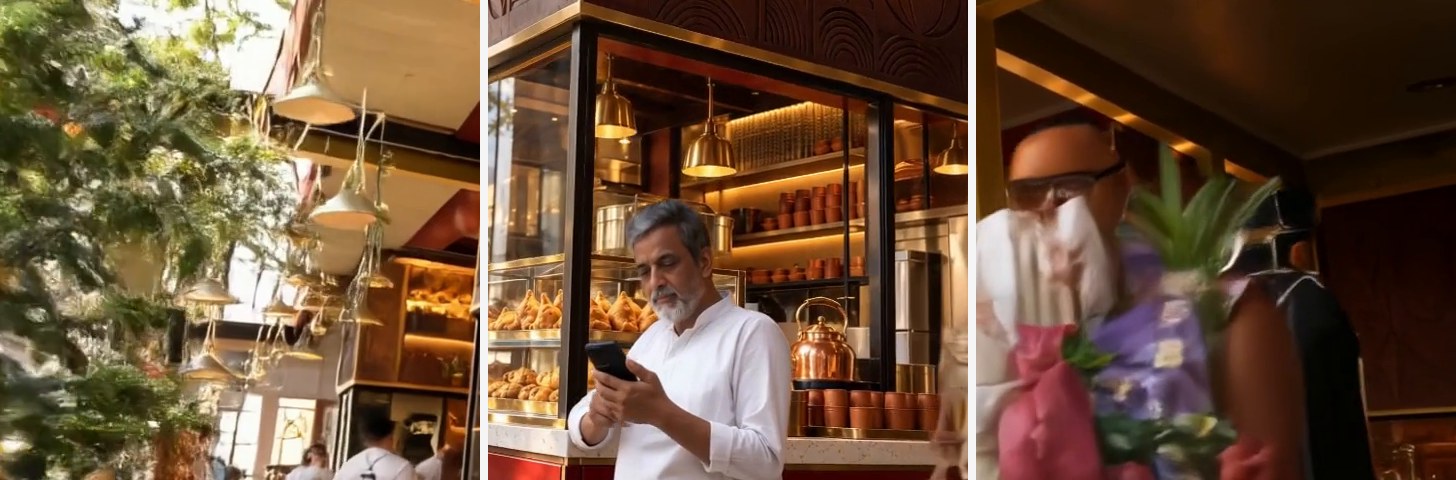
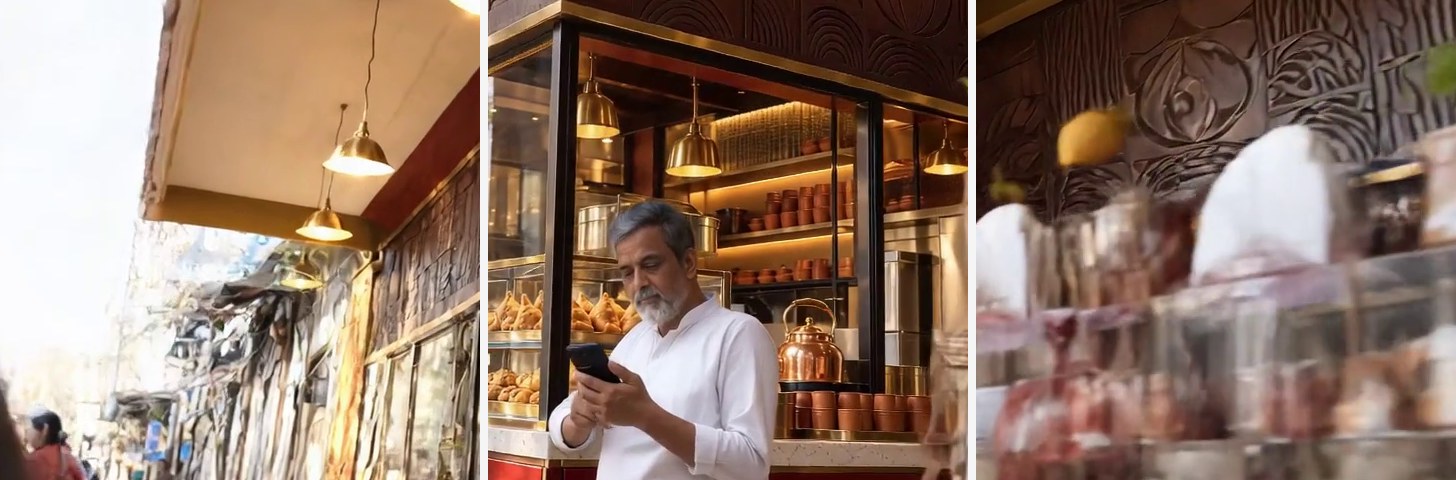
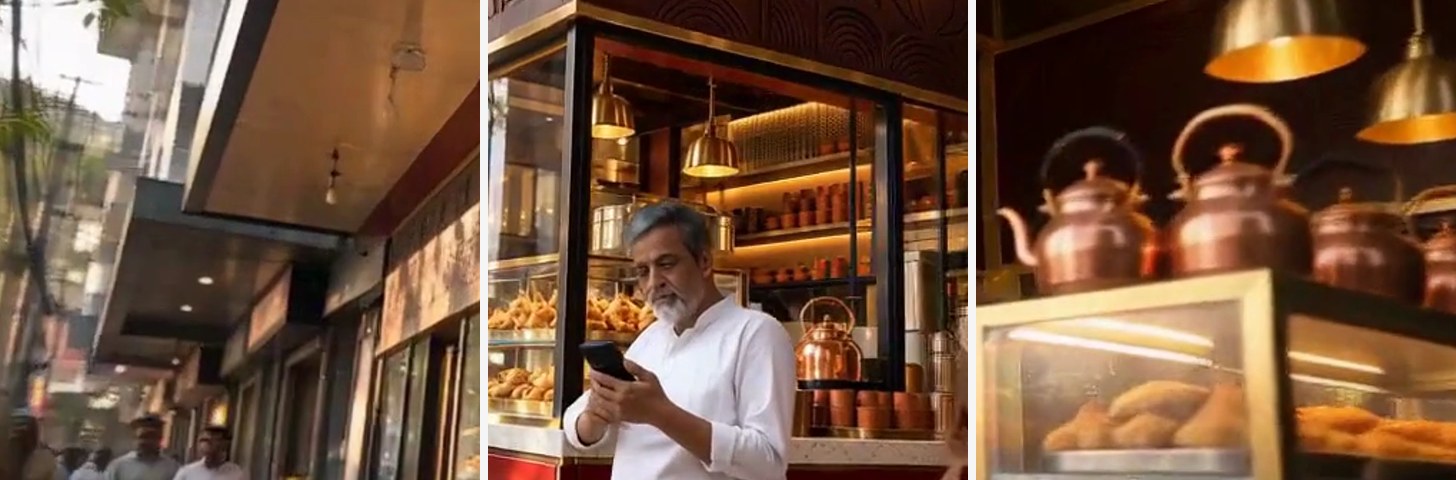
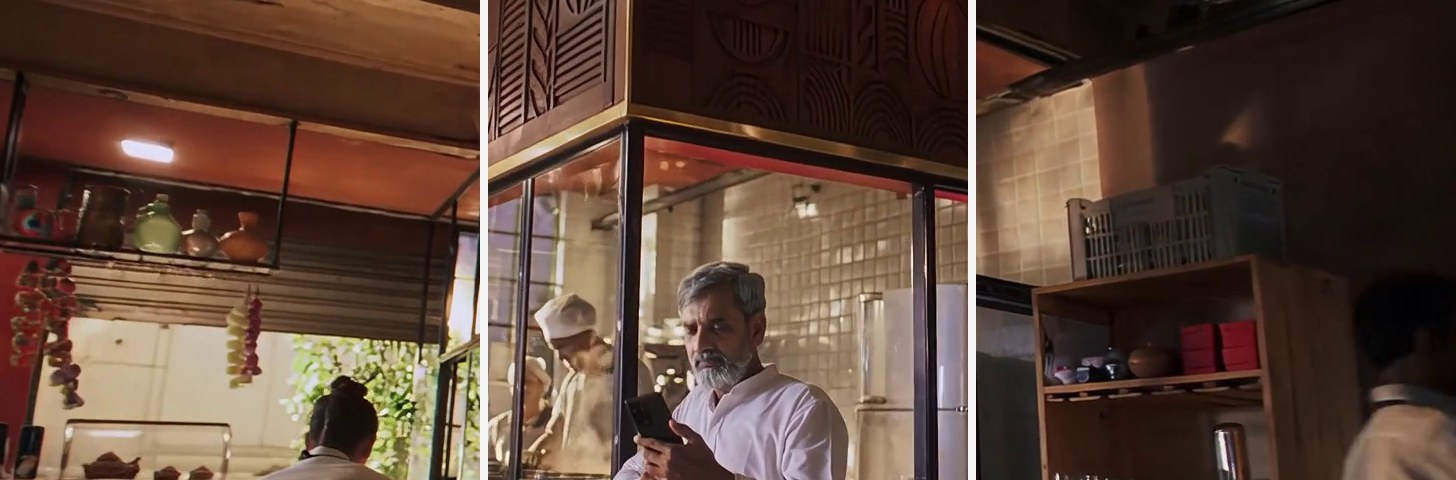
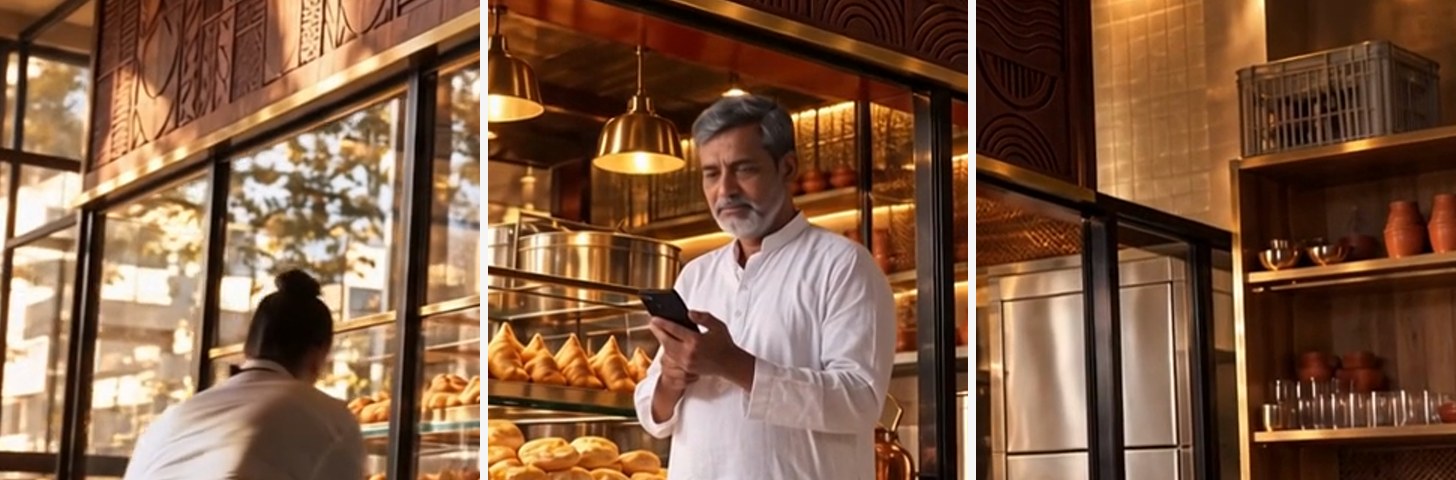
The edits win, and it is not close. An edit starts from a real wide frame, so its sides have real geometry, real depth and real people. A reframe has to invent them, and at two thirds of the frame the invention shows. Reframing is worth it for small additions, a strip of wall or sky, not for turning a vertical cut into a horizontal one.
Cost of every run
| Route · platform | Quality | Output | Cost basis | Per 5 s |
|---|---|---|---|---|
| Genjutsu Lite · Higgsfield | High | 1920 × 1080 | 4 credits per second at $0.049 a credit | ≈ $0.98 |
| Genjutsu · Higgsfield | High | 1920 × 1080 | 20 credits per second at $0.049 a credit | ≈ $4.92 |
| Seedance 2.5 1080p · Higgsfield | Medium | 1920 × 1080 | 16 credits per second at $0.049 a credit | ≈ $3.93 |
| Kling 4.0 · Kling.ai | High | 1280 × 720 | 60 credits at $0.0133 a credit | ≈ $0.80 |
| Kling 4.0 Edit · fal | High | 1920 × 1080 | $0.141 per second of input plus output | ≈ $1.41 |
| Wan 3.0 edit · fal | High | 1920 × 1080 | $0.20 per second of input plus output; average of three runs | ≈ $2.00 |
| LTX-2.3 Reframe · fal | Low | 1920 × 1080 | $0.20 per second at 1080p | ≈ $1.00 |
| H3 Max Reframe · fal | Medium | 1344 × 768 | $0.08 per second at 768p, its highest setting | ≈ $0.40 |
| Luma Ray 3.2 Reframe · fal | Low | 1920 × 1088 | $0.36 per started second at 1080p | ≈ $1.80 |
Every route is priced for 5 seconds of footage at standard list prices, so the rows compare directly. Higgsfield credits use the Plus plan billed monthly, $59 for 1,200 credits. Kling.ai credits use the Standard plan billed monthly, $8.80 for 660 credits. Rates change; check fal, Higgsfield and Kling.ai for current figures.
What to take away
- Make the stills first. Every route above took the same approved people and places, which is what kept the cast consistent across tools and formats.
- Check that the tool edits, not re-generates. Play the result beside the source. If people stand still or the framing changes, it was a new generation.
- Keep each edit run small. Two or three shots, only the pictures those shots need, and every leftover named in the prompt. An overloaded run recasts the people and quietly skips the rest.
- Pick per shot. Kling 4.0 for location swaps, Wan 3.0 when the background crowd matters. Both keep the cuts, so the shots mix cleanly.
- Remake each format from its source. If a horizontal original exists, edit it. Outpainting a vertical cut invents two thirds of the frame.
- Cut the unused shots before paying. Edits bill the input seconds too, so drop the shots the final cut does not use.
The prompt buttons show the structure of the prompts we used, with the shot-specific details replaced by placeholders in square brackets.
Plan a remake like this
AI Video Starter is a three-hour live workshop: reference pictures, choosing the model for each shot, fixing failed takes and assembly, on your own short video.
See the workshops ↗