
The footage is the most common kind a creator has: a 48-second vertical selfie, phone held at arm's length, a plain room behind, a lilac T-shirt, natural gestures and speech in Russian. The goal was to put the same speaker in a warm evening living room, wearing a tailored blue blazer, without touching what makes the clip hers: the face, the hair, every gesture, the mouth shapes and the voice.
That rules out a lot. The viewer is looking straight at a face that talks, so a few frames of a mouth that does not match the words, or a face smoothed into someone slightly different, are enough to lose them. The clips below have no sound on purpose: the speech is in Russian, and what matters here is what you can see.
The process that worked
- Pick a short test piece first. We cut five seconds (35.4–40.4 s) from the phone file, converted from 4K at 120 fps to 1080×1920 at 30 fps, with the sound kept. Test on five seconds before paying for forty-eight.
- Prepare one reference still of the target look. A single frame of the same person already in the new outfit and the new room. One image can carry both the wardrobe and the location, as long as the prompt says it defines nothing else.
- Run Seedance 2.5 in Video Edit mode. The source clip is the video reference, the still is the image reference, and the prompt is written as an edit order: what changes, what is the master, and what must not move. Generated sound is switched off.
- Check the length. Our 5.00-second source came back as 4.71 seconds, its motion played about 6% fast. Stretched back to 5.00 s, the gestures lined up with the source within two frames.
- Put the original voice back. The speaker's own recording goes on top of the retimed picture, so the voice is never a reconstruction.
- Check the face at full size, then the lips with sound. Crop the face at 1:1 against the source before calling it done. Overlays, captions and inserts are added in the edit afterwards, never sent through the model.
Inputs you need
- The source clip, at least 4 seconds and at most 30 seconds per run (split longer takes).
- A reference still of the target outfit and room, ideally with the same person in it.
- The original audio, kept aside to be laid back on the result.
- The spoken language, so the mouth shapes follow the right phonetics.
- A plain list of what must survive (face, hair, hands, timing) and what must go (the old room, the old clothes, anything printed on the wall).
Route 1: restyle the real footage
This route keeps the recorded performance and redraws only what should change. We ran it on two Higgsfield models with the same five-second clip and the same reference still.
Source
Phone recording
The input: a plain room, a lilac T-shirt, natural gestures, hand-held selfie movement.
Reference
Target room and outfit
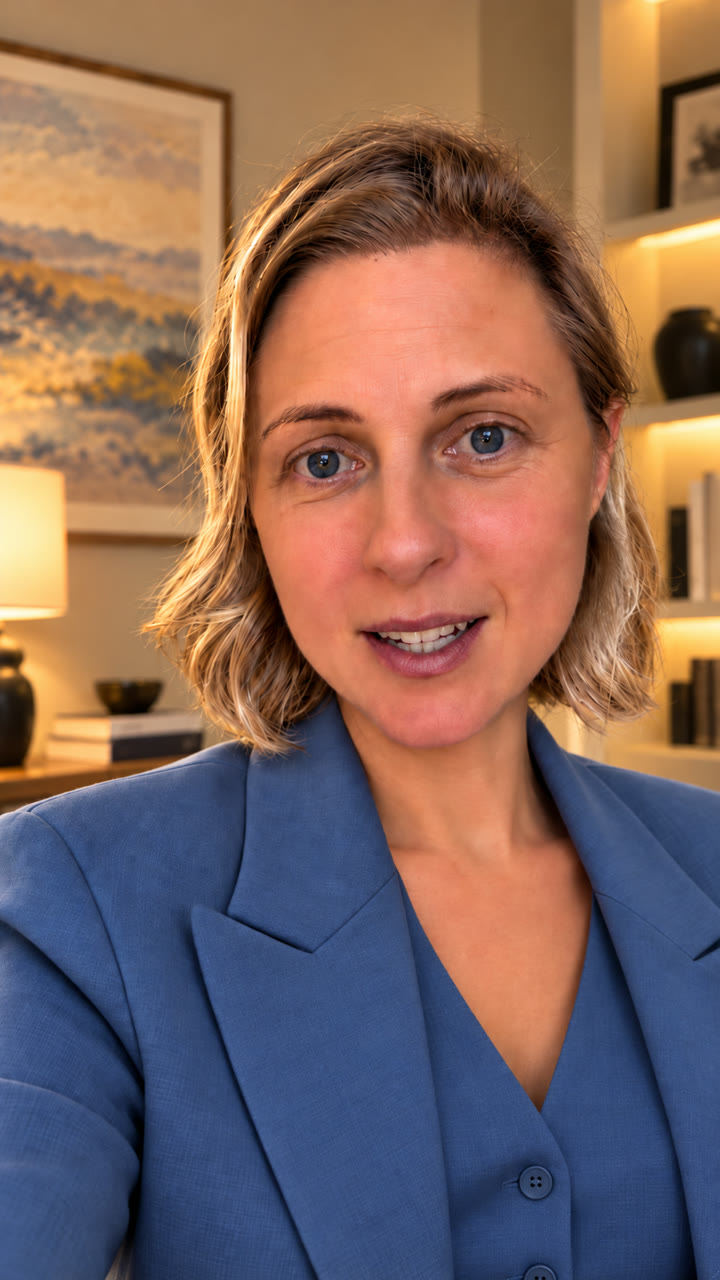
The reference both takes received: it defines the outfit and room, nothing else.
Take A · selected
Seedance 2.5 Video Edit
Room and outfit both changed; the face keeps its lines and skin texture, and the blinks, mouth shapes and hand gesture land where the source has them. We retimed the output before adding the original voice.
Take B
Higgsfield Genjutsu
Motion transfer copies the performance closely and adds the blazer, but the old room stays, and the face comes out smoother and less like the source. Genjutsu takes no prompt.
Seedance 2.5 is the model to use when a real person stays in frame. It was the only one that changed the room and the clothes while keeping a face you would recognise at full size. Genjutsu did half the job and softened the face. We also upscaled the Genjutsu clip from 720p to 1080p with ByteDance Video Upscale: the upscaler invents lashes and texture, and on a face that had already drifted it made the result look worse, not better. Upscaling does not fix a weaker model.
The mode matters as much as the model. Our first two Seedance 2.5 attempts used
the reference (omni) mode with the clip attached as a video reference. Both failed after about
45 seconds and were refunded, with no reason given through the API. The Higgsfield web page gave
the answer: Your prompt looks like a video editing request. Switch to the Video Edit mode so
the result follows your input video.
In Video Edit mode the same job went through on the
first try. Video Edit bills by the length of the source clip: 38 credits for five seconds at
720p.
Route 2: cut the person out and composite
The cheaper route never redraws the person. A matting model finds which pixels belong to the speaker; the original pixels are then laid over a new background with ffmpeg. We compared three providers on a seven-second piece of the same recording, with a city view from a window as the new background. This piece carries three small inserted video overlays, shown as they appeared in the input.
Source
Working clip
What every provider was given, overlays included.
Cut-out 1 · laptop
RobustVideoMatting
Free and private, but the old room shows through around the hair, and the inserted overlays were treated as background and replaced.
Cut-out 2 · HuggingFace
BiRefNet
Free inside the daily GPU allowance. Each frame is cut out on its own, so edges can shimmer from frame to frame.
Cut-out 3 · fal.ai
VEED · edges refined
The cleanest of the three, and it kept the overlays, but a light fringe of the old background still shows at the hair.
| Provider | Model | Time | Cost | What showed up |
|---|---|---|---|---|
| Laptop (Intel i7, CPU) | RobustVideoMatting | 2 min 01 s | free | Old background around the hair; overlays replaced |
| HuggingFace Space | BiRefNet | 3 min 52 s | free quota | Frame-by-frame edges; hair fringe |
| fal.ai | VEED background removal | 1 min 16 s | $0.16 | Cleanest; overlays kept; light hair fringe |
| Higgsfield | Video Background Remover | not run | 1 credit | Failed on this clip from a login setting; on a separate test clip it returned the person on black |
The weak point of every cut-out is the same: fine hair against a bright wall. Each result keeps some of the old room between the strands, which reads as a halo against a new sky. Inserted overlays are the second trap: a matting model only knows the person and everything else, so keep overlays out of the clip you send and add them back in the edit.
Route 3: regenerate the speaker from one photo
The third route throws the footage away and animates a single photo with the original voice. We gave two avatar models the same still of the speaker at a lakeside marina and the first 5.55 seconds of her recorded speech, ending on a natural pause.
Source photo
Marina portrait
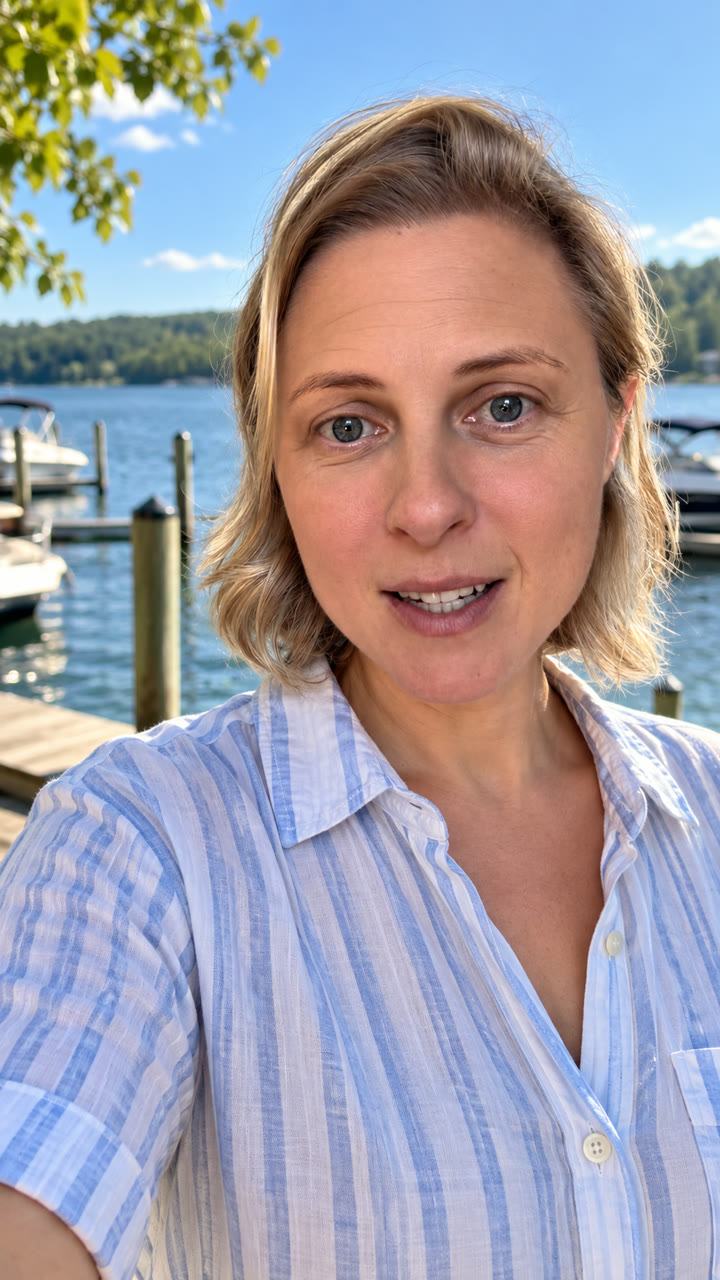
The single photo both avatar models animated, with the speaker’s own voice.
Avatar 1
OmniHuman 1.5
Lively head and mouth movement, but the skin is smoothed and she looks slightly younger. $0.89 on fal, 3 minutes.
Avatar 2
Kling AI Avatar v2 Pro
Closer to the photo, with freckles and texture kept and a believable hand-held sway. $0.83 on fal, 7 minutes.
Both keep the real voice, because they only animate the face to it. What they cannot keep is the real performance: every gesture and head turn is invented. That suits a new piece to camera, but it is a different video, not the original one in a new room.
The template
This is the full restyle template in its most general form: it can replace the room, the wardrobe and the hair, keep chosen props from the source, and re-cut one take into several angles. Fill the bracketed slots and delete what your job does not need. On Higgsfield, submit it in Seedance 2.5 Video Edit mode.
- Keeping the speaker's own hair: make
@Lookwardrobe only. - Nothing to keep from the old room: delete the props line.
- One continuous take, such as a selfie: use a single stage, and delete the lines about new angles and shot sizes.
- Phone footage: replace the cinema-camera style line with "photoreal phone video matching the source", or the result will not cut with the rest of the recording.
- The original voice: switch generated sound off and lay the recording back afterwards.
| Route | Room | Outfit | Real performance | Face | Cost |
|---|---|---|---|---|---|
| Seedance 2.5 Video Edit | new | new | kept | closest to source | 38 credits / 5 s |
| Genjutsu motion transfer | old room | new | kept | smoothed | 35 credits / 5 s |
| Genjutsu + 1080p upscale | old room | new | kept | worse than 720p | +1 credit |
| Cut-out and composite | new | old | untouched | untouched; hair fringe | free–$0.16 / 7 s |
| Photo avatar | from the photo | from the photo | invented | smoothed or close | $0.83–0.89 / 5.6 s |
Evidence
- Date
- 1–2 October 2026
- Basis
- Observed from seven generated outputs, one source recording, one reference still and one photo; costs from the Higgsfield and fal billing records of each run
- Subject
- A vertical selfie talking head in Russian: a 5-second piece for restyling and avatars, a 7-second piece for cut-outs
- Measured
- Room and outfit change, face likeness at full size, gesture and mouth timing against the source, hair edges, run time and cost
- Caveat
- One speaker, one test piece per route, judged by eye. A production case study, not a model benchmark.
Keep the person, change the world around them
easyai.video keeps the source clip, the reference still, the prompt and the model choice together, so the next restyle starts from what already worked.
Join the waitlist ↗